
Release Notes will be posted prior to each release, giving you a preview of the new features, improvements, and fixes planned for the upcoming week.
All updates are thoroughly tested in our Staging environment for one full week before going live. This ensures we catch and resolve any issues early so your experience remains smooth, stable, and uninterrupted.
Cloud Platform Update V928
This release adds iOS device-based groups for classroom sessions, along with default sorting, filtering, and grouping for safeguarding captures. It also improves Web Filter policy management, safeguarding workflows, and account configuration. Fixes address policy settings, live sessions, capture notes, synchronization, and time blocks.
ContentKeeper
Web Filtering
- The Ignore option has been removed from Default Policy category settings for clearer, more consistent policy configuration.
- Administrators can now scroll through the full list of URLs in Local URL Classification.
StudentKeeper
Classroom Management
-
Device-Based Groups for iOS. Administrators can upload iOS devices and organize them into groups for classroom monitoring and safeguarding sessions.
-
Upload devices
- Go to System Settings > Customer Configuration > Shared Devices.
- Download the CSV template and complete the required device fields.
- For iOS devices, ensure the device identifier matches the login string.
- Set Device Client Type to iOS.
- Upload the completed CSV.
- Confirm that the appropriate user groups have permission to access Device Groups
-
Create a Device Group
- Open Classroom Management.
- Select “Create Group.”
- Select “Device Group.”
- Enter the group name and assign teachers as usual.
- Select the devices to include.
- Select students, or choose All to use the entire roster.
- Save the group.
-
-
Start a Device Session
- Start the device session.
- If needed, assign devices to students using the drop-down menu.
-
Move a Capture or Note
- If a device is not assigned to a student, any notes or captures generated during the session are saved to the device profile.
- From the device profile, move the note or capture to the correct student.
- Teachers can now sort thumbnails in a live session without encountering an error.
- School-based users can now sort session history as expected.
- Teachers can now create Capture Quick Notes from captures with the correct timestamp.
- Online devices now appear at the top of a teacher’s session as expected.
Safeguarding
- Default Capture Sorting, Filtering, and Grouping. Student captures now default to risk-based sorting, a 24-hour filter, and grouping by student and category to support faster triage and escalation.
- Safeguarding Leads can group captures by student, keyword, classification, or severity for easier bulk management. This replaces the previous Grouped Capture view.
- Safeguarding Leads can now update Safeguarding settings without encountering an error.
-
Improved Safeguarding Workflow and Machine Learning Categories: Users with OCR captures active now have categories separated from keywords. This allows Safeguarding Leads to choose to receive alerts only for high-risk captures in a category.
-
Set Up Categories
- Go to Safeguard Settings and open an existing setting.
- Scroll to System Keywords, then turn off captures and notifications for keywords.
- For each category, choose whether activity should be captured.
- Assign a workflow based on risk level. Risk is determined by the model’s confidence score.
- Choose the users who should receive alerts, the note type, and the alert channel.
- Review System and Custom Keywords, and remove any capture or notification settings you no longer need.
-
Recommended Use
- Use keywords only for a specific behavior or action.
- Choose an alert for every capture when immediate action is needed.
- Use bundled Reporting notifications when a summary is more appropriate.
-
Set Up Categories
-
New Feature: Safeguard setting change history has been added to help schools support KCSIE compliance by providing an audit trail of capture-setting changes.
- There are two Tabs covering Safeguard Settings and Keyword Group changes
- Settings Change History will log changes to the name, description, status, schools/groups included and the date/time and user that made the changes. It will also log creation and deletion of any Settings
- Keyword Group Change History logs the safeguarding categories and keyword groups, any changes to the configuration, risk level or capture enablement for each Safeguard Setting.
Platform
Administration
- Stale users are now removed correctly after synchronization.
- Additional external identifier options allow students to sign in to StudentKeeper without extra Edlink configuration. Administrators can also configure login values without special characters.
- Time blocks now display on the configured day instead of the previous day.
Cloud Platform Update V914
This release improves safeguarding triage with flexible Capture sorting and dynamic filters, while reducing unnecessary alerts and improving email delivery. Classroom and reporting updates provide clearer session monitoring, more consistent user management, closed-tab visibility, and the ability to send scheduled reports immediately. The release also strengthens Custom URL and SIS data management, while advancing iOS Device-Based Groups and Family Portal controls internally.
ContentKeeper
Web Filtering
- Administrators can now reliably manage Custom URLs with trailing slashes, ensuring changes are correctly retained and synchronized.
StudentKeeper
Classroom Management
- Session Captures now remain scoped to the teacher who owns the class. Administrators and Safeguarding Leads can view them when filtering for a specific class, keeping the main triage queue focused on safeguarding concerns.
- Manually created users now appear in Profiles alongside synced users. This gives administrators a consistent place to find and manage all users.
- Teachers can now track the same keyword across Session Controls. This supports more flexible and consistent monitoring during class sessions. In addition, improvements to notifications ensure teachers are aware when an event is captured.
Safeguarding
- New Feature! Advanced Safeguarding customers can now see enhanced context and machine-learning classifications for OCR captures, and provide feedback to help refine results.
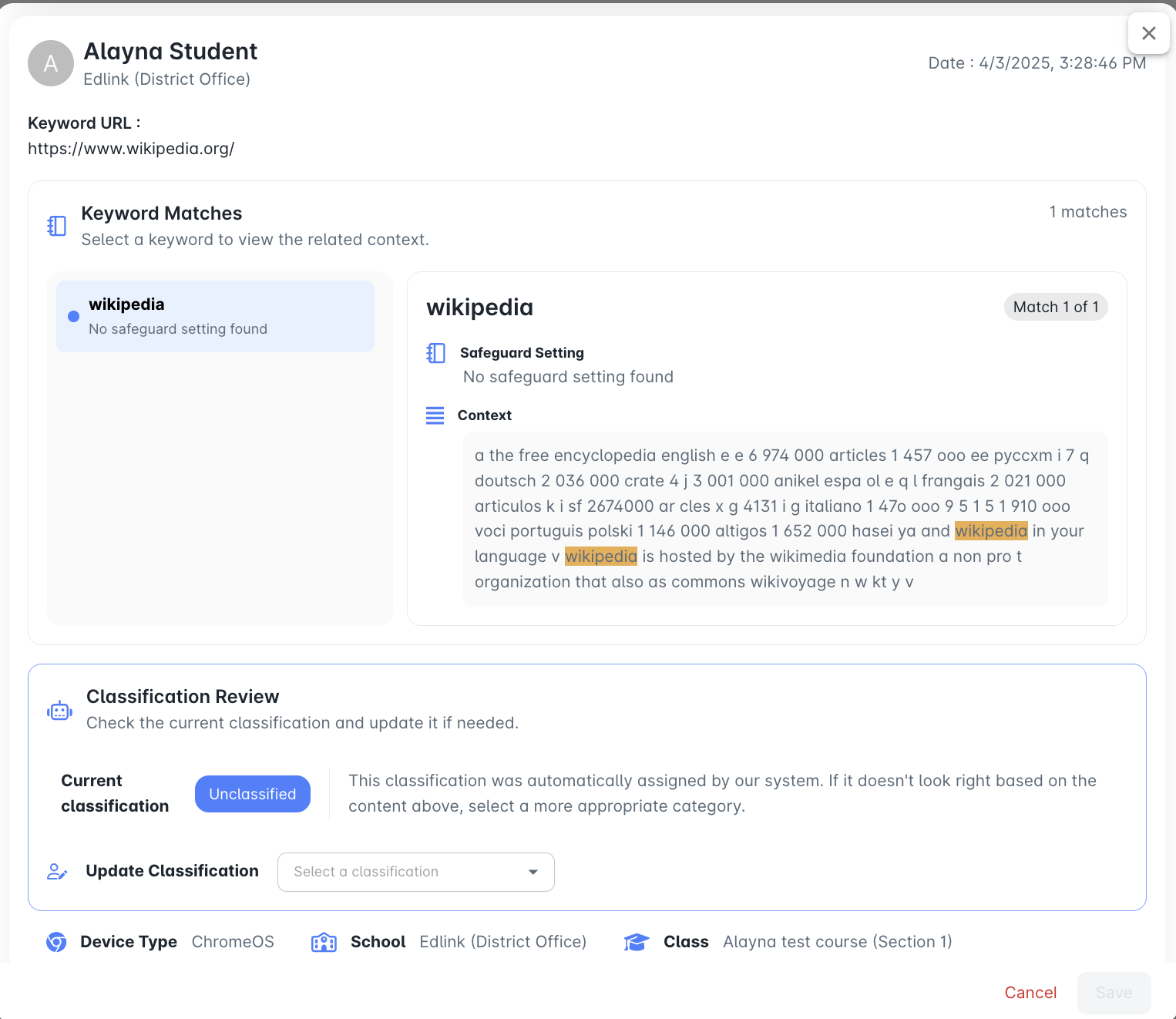
- New Recommendation! For the best alerting experience, use System Safeguarding Categories as your primary capture method, then add custom keywords for organization-specific needs.
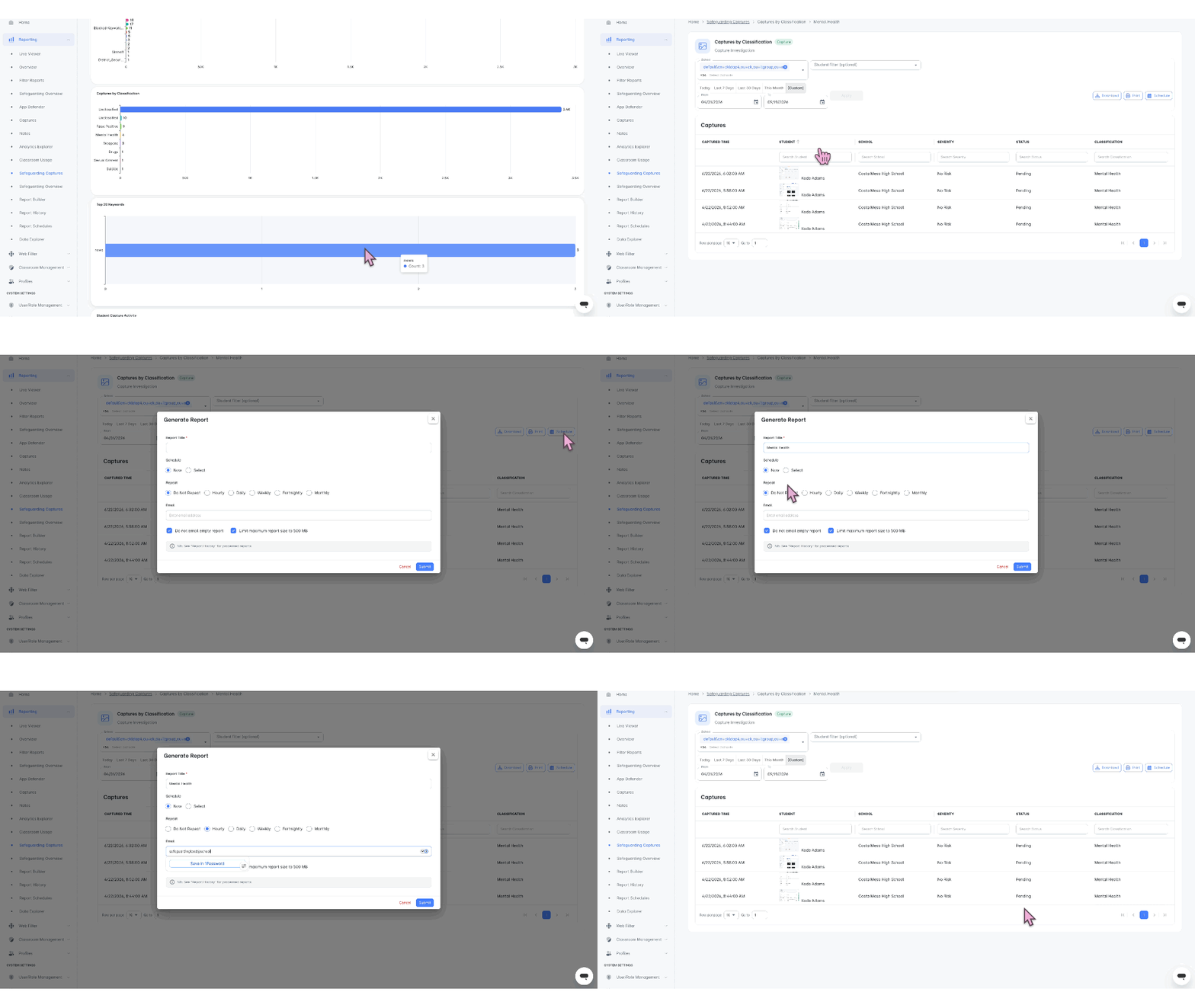
- New Feature! Safeguarding Leads can now sort Captures by newest, oldest, or severity. This makes it easier to prioritize urgent concerns and manage the triage queue.
- New Feature! Capture filters now narrow results dynamically as selections are made and support lists containing more than 20 schools. These improvements help Safeguarding Leads find relevant Captures and complete triage faster.
- Terms excluded from the Blocked Keywords (CK Appliance) list no longer generate Captures or ContentKeeper search-term violations. This reduces unnecessary alerts and helps safeguarding teams focus on relevant concerns.
- Capture alert emails now send more reliably. This helps school staff receive important safeguarding information promptly.
Platform
Administration
- Deleted SIS records no longer appear across Notes, school domains, Metabase reports, manual classes, workflows, Shared Devices, user management, and Profile listings. Additional cleanup across Safeguarding Settings, New Reporting, Captures, and Classroom Management is planned for a future release.
Reporting
- Send Scheduled Reports Now: Report schedules now include an option to send a scheduled report immediately. This gives administrators more control over time-sensitive updates without waiting for the next scheduled delivery.
-
Closed Tab Reporting: Classroom Usage reports now include closed-tab events. This gives administrators a more complete view of how students and teachers interact during classroom sessions.
Cloud Platform Update V831
This release significantly expands reporting with new and improved Classroom Usage, Safeguarding Overview, and Safeguarding Captures dashboards, plus scheduling for full reports and drill-down results. ContentKeeper updates broaden App Defender coverage, and improve captive portal target management. StudentKeeper enhancements strengthen classroom timeout enforcement, Capture Trigger management, and safeguarding alert delivery.
Reporting
-
New and Improved Dashboards!
- Classroom Usage Reports: Administrators can now see how teachers engage with students through Classroom Tools, including messages sent and commonly used actions. Drill-down insights help identify where teachers may benefit from additional support.
- Safeguarding Overview: Administrators and Safeguarding Leads can now explore student Note data in greater detail, helping them identify emerging trends and areas where intervention may be needed.
- Safeguarding Captures Report: Administrators and Safeguarding Leads gain a holistic view of Capture activity to identify trends and areas requiring attention. Built-in scheduling provides regular Capture updates, reducing reliance on individual alerts for each Capture.
- Report Scheduling: Administrators can schedule complete dashboard reports or selected drill-down results directly from the dashboard. Scheduled reports can be managed from the Report Schedules page, while Report History provides details about report delivery.
ContentKeeper
Web Filtering
- Administrators can now manage AdGuard VPN, Cloudflare WARP, Planet VPN, Qustodio Web, and Urban VPN through App Defender in StudentKeeper.
- Administrators can now clearly identify invalid Custom URL entries that prevent policy changes from being saved.
StudentKeeper
Classroom Management
- Classroom sessions for schools without a school-specific timeout now end according to the configured default session timeout.
- Session Controls configured Trigger Captures now display the configured Note title, keywords, alerts, and other Note settings. Authorized users can edit or delete trigger settings, while users without the required permissions cannot create or modify triggers. Alert labels are also displayed consistently throughout the interface.
Safeguarding
- Safeguarding Alerts benefit from improvements in email delivery ensuring school staff are alerted to concerns in a timely manner.
Platform
Administration
- Manually added users will no longer encounter error using SSO if they had a previously removed user coming from a data integration.
Cloud Platform Update V817
This update introduces enhanced safeguarding alerts and Capture workflows, risk levels for Notes, and improved Capture sorting and triage.
ContentKeeper
Web Filtering
- Administrators can now reliably configure Time of Day settings for Web Services, including when editing multiple policies. 87032, 89895
StudentKeeper
Classroom Management
- When time blocks are active, only Administrators can access classes, ensuring they can continue troubleshooting and completing student safety tasks. 85880
- Teachers can manage keyword triggers more easily with the redesigned Session Control modal. 86887
Safeguarding
- Alerts now provide users more complete context and direct access to relevant information.
- Alerts include Severity/Risk Level and a direct capture link.
- Class and School Name placeholders now display correctly in session alerts.
- Copy URL creates a shareable link that opens the capture for authorized users.
-
Teachers and Safeguarding leads can now access Quick Note form directly from the detail Capture modal.
- Safeguarding Leads can now sort Captures by Most Recent or Oldest, making it easier to use Select All and bulk actions to organize and triage the Capture queue. 88171
- Safeguarding teams can now assign a risk level to Notes, improving concern tracking and prioritization. 87260
Platform
Administration
-
Microsoft SSO users will no longer encounter a permission error state. 90116
Cloud Platform Update V803
This update introduces Note and Capture reassignment, in-session web list updates, and improvements to safeguarding classification, appliance visibility, user profile performance, and authentication management. This release also includes bug fixes, performance improvements, and security updates.
ContentKeeper
- Appliance Link now displays the ContentKeeper Version and Cloud Link Version, making it easier for Administrators to verify the connected appliance environment. 89523
StudentKeeper
Classroom Management
- Teachers can easily update web lists during a class session, enabling them to make changes on the fly. 87788
Safeguarding
- New! Note & Capture Reassignment: When a Note or Capture is associated with the wrong student—or generated on a device that is not signed in using a recognized student login string—it can now be reassigned to the correct student. All changes remain visible in StudentKeeper, helping Safeguarding Leads maintain complete and accurate student timelines.
- New Safeguarding Sub-Types: Safeguarding Leads and Administrators can now classify concerns more accurately with additional sub-types. Intimidation, Social Exclusion, Peer Conflict, and Gambling have been added under Behavior, while Online Gambling has been added under Technology. 89828
- Automation emails now use the value configured in the Subject field of the selected Notification Template. The Title field remains reserved for identifying and displaying the template within StudentKeeper. 88597
- Improved performance when StudentKeeper user open user profiles 89676
Platform
Administration
- Removed stale integration records in preparation for new school year. 89256
- Administrators can now filter login strings and data sources now display enabling for simplified user authentication management. 89472, 89654
- Device-Based Groups Preview: Administrators managing shared iPads can now preview Shared Devices under Configuration and the new Devices section under Profiles, helping schools prepare for the full Device-Based Groups release.
Known Issue
-
In areas across the product, when an item is deleted, or when sorting is used with filtering, the UI may not updated right away. To solve this, users can refresh their screen. A solution is under development.
Cloud Platform Update V720
This release focuses on improving administrative efficiency, reliability, and scalability across ContentKeeper and StudentKeeper. Updates include more flexible URL exception management, improved performance for large URL lists, more accurate local URL classification, streamlined safeguarding workflows, and stronger synchronization performance. The release also introduces the Login String Configuration tool, helping administrators match students consistently across devices and synchronized identity systems.
ContentKeeper
Web Filtering
A new Bulk Import option has been added URL Exceptions to simplify managing larger exception lists. ChromeOS device client v1.2.19.1543 or greater is required to support this option. 87780
Administrator’s experience with Custom URLs has enhanced with improved reliability and performance when working with large URL lists. The Add URL and Import URLs options have also been moved to the top of the list for easier access. 88976
Administrators have an improved experience when handling Local URL Classification to ensure URLs entered with a trailing forward slash (/) are classified correctly. 88682
StudentKeeper
- Sneak Peak!: Ativion administrators can begin building Device-Based Groups for iPads allowing teams to begin early planning and setup for the new school year. Full implementation is coming soon! 88957
Safeguarding
- Safeguarding Leads and Administrators now benefit from enhanced capture triage, including improved school association for captures and CPOMS submissions, consistent Notes iconography, and the removal of unsupported Automation triggers. 88835, 88641, 88787, 89116, 89309, 89279, 89432
Platform
Customer Configuration
- New! Login String Configuration Tool: Administrators can now create custom login strings using synced student data to ensure students are matched correctly across StudentKeeper and ContentKeeper, regardless of the username format used on their device.
How it works
The Login String Configuration tool allows administrators to build additional login strings from supported identity fields synchronized from providers such as Wonde, Edlink, or Entra. This is especially useful when the username students use to sign in to their devices does not exactly match the identity information provided by the synchronization source.
-
Common examples include:
Usernames that remove special characters or symbols.
Usernames that use only part of an email address (everything before the @).
Usernames that combine multiple fields into a custom format.
Environments where the device login follows a district-specific naming convention.
By defining the expected login format, StudentKeeper can consistently identify students and ensure monitoring, filtering, and classroom management function correctly across supported device types. 89135, 89117, 88593
Administration
- Implemented a series of enhancements to improve sync reliability and performance ahead of the new school year. 89264, 88842
Reporting
- Removed the five school constraint on reports for Partners and Multi-Academy trust Users. Safeguarding Leads and Administrators can now view a single report with up to 30 schools. 89196, 89244
-
Known Issue: Reports that process large amounts of data may take longer to load, particularly during periods of high demand. Thank you for your patience as we continue working towards releasing our next generation of reporting.
Cloud Platform Update V706
ContentKeeper
Web Filtering
- Policy Management: Custom URLs entered with http:// or https:// are now handled automatically, ensuring these match correctly during policy verification without requiring manual formatting. 88268
- Policy Synchronization: Improved the reliability of policy synchronization between ContentKeeper and StudentKeeper. 88548
- Live Viewer: Clearing filters in Live Viewer now fully removes all applied filters, providing a more consistent user experience. 87445
App Defender
- Skype has been removed from the Applications and Protocols menu following its retirement by Microsoft and is no longer available for selection. 84787
StudentKeeper
Classroom Management
- A condition existed that caused new Classes not to appear in the Classes panel . This condition has been addressed and Classes appear as expected. 88949
Safeguarding
- Bulk Actions for Capture Triage: Safeguarding teams can now select multiple screen captures and perform bulk actions, making it faster to manage high volumes of related captures while improving workflow efficiency. 87743
- School Information Listed on Captures: Captures display school information when applicable helping Admins escalate issues to the proper staff members quickly. 76027
- Quick Note Support for Captures: Users with Capture access can now convert a screen capture into a Note directly from the Capture panel without leaving your triage workflow. The created Note automatically includes the associated screen capture, preserving visual context alongside any observations manually added. This makes it easier to document safeguarding concerns, maintain a complete record, and review or search for related information later. 87980
- When screen captures did not have an associated student record, the Captures page could fail to display all available captures or paginate correctly. This issue has now been corrected. 88582
Platform
Reporting
- School-Based Report Access for Multi-School Organizations: Report scheduling and drill-down now support school-based data access for multi-school deployments. When School Mapping is configured and user role has new “Interactive Reporting” permission, users only see data for their assigned schools, allowing Safeguarding Leads to schedule reports and investigate results without access to data from other schools. This also enables Administrators to delegate reporting responsibilities while maintaining appropriate data separation.88721, 88946, 88754, 87459
Partner Platform
- Completed UI cleanup to ensure partners only see relevant menu items. 85166
Cloud Platform Update V619
ContentKeeper
Web Filter
- Improved Custom URL validation with clearer error messaging and enhanced support for valid URL, wildcard, and regular expression entries, making filtering rules easier to create and manage. 87026
StudentKeeper
Classroom Management
- Improved device thumbnail performance for faster loading and a more responsive Classroom Management experience. 85081, 85078, 84085, 85080, 85079
Safeguarding
-
New! Capture filtering has been redesigned to make triage faster and more precise. Filter options now auto-populate and provide clearer selections for criteria such as Student, Risk, Category, and Exclude False Positives. You can combine multiple filters to quickly narrow results and focus on the captures that matter most. 87377
- Resolved issues that could prevent student profiles from opening or being viewed as expected. 87640, 87932
Platform
-
Partner Platform
- Device Client downloads are now available from the Partner level for Super Partners managing filter deployments. 85270
Cloud Platform Update V606
ContentKeeper
-
New Feature! Stop Proxy Circumvention in Real Time. Real-time circumvention detection arrives on ChromeOS. StudentKeeper identifies and blocks web-based proxy sites as students attempt to use them, extending your filtering policy to cover bypass attempts that occur outside of standard category-based filtering. 85652, 85650, 85654, 85656, 85655
- See Enabling and Controlling Circumvention Detection for setup and guidance.
Learn More
-
Improved language related to adding keywords to a policy. This change better reflects the actions associated with each setting. 82537
- The Allow option has been renamed to Monitor to better reflect its behavior. Keywords remain accessible to students while still being logged in reports, giving schools greater visibility into student activity and safeguarding concerns without unnecessarily blocking content.
- The Blocked setting remains unchanged and prevents students from accessing content that contains the selected keywords. This more restrictive option is best suited for high-risk categories, such as adult content, where access should be actively prevented rather than monitored.
Learn More
- Success notifications now display the correct message when creating and updating Web Filter policies, providing clearer confirmation that policy changes have been saved successfully. 87024
Student Keeper
Classroom Management
-
New Feature! Multiple Device Support in Class Sessions: When a student is logged in on multiple devices during an active class session, each device is now displayed as its own thumbnail. This gives teachers complete visibility into student activity across devices while ensuring classroom tools can be applied accurately to the specific device being used.
86071, 87237
- Resolved issue with drag and drop ordering within a class session. 87466
- Added tooltip support for Session History when iOS mixed is enabled for a school. 87101
Safeguarding
-
New Feature! Quick Note Inside Class Session: It’s now easier to document student behavior, achievements, and safeguarding concerns with Quick Notes. 86436, 86886
- During an active class session, simply click the notebook icon beneath a student’s thumbnail to open a streamlined note entry form with key information automatically pre-filled. This allows you to create notes faster, improve accountability and compliance tracking, and spend more time focused on teaching rather than administrative tasks.
Learn More
-
New Note Type! Attendance Tracking: The new Attendance Note Type makes it easy for teachers to record attendance-related events directly on a student’s timeline. This creates richer safeguarding records, improves visibility into attendance patterns, and helps schools identify trends that may require additional support or intervention. 86490
-
Sub Types of Attendance Note include:
- Present
- Absent
- Late
- Missed Portion
- Took Break
- Left Early
- Suspension
- Learning off Campus
Learn More
-
Sub Types of Attendance Note include:
-
New Note Type! Technology Oversight: The Technology Note Type allows teachers, administrators, and IT staff to easily record device-related incidents and observations on a student’s timeline. This creates richer safeguarding records, improves visibility into recurring technology concerns, and provides better oversight of student device usage and support history. 86437
-
Sub Types of Technology Note include:
- Game Play in Class
- Inappropriate Content
- Off Task
- Social Media
- AI Misuse
- Device Damage
- Water Damage
- Missing Keys
- Broken Screen
- Lost Device
- Impersonating Another User
- Violation of Use Policy
- Loaner Device
- Borrowed Charger
- VPN or Proxy Use
- Circumvention of Systems
- Battery Drain
- Other
Learn More
-
Sub Types of Technology Note include:
- Overall improvements to Notes architecture for supportability, clarity and performance. 69378, 85797, 86912, 76124, 81285
- Risk level removed from Automations for captures to clarify workflow and reduce configuration error. 87058
Platform
- Resolved password reset 404 and 500 errors. 86757
- Addressed several reporting-related issues, including access problems within Safeguarding Overview, report loading reliability, system performance and responsiveness, and partner access to reporting data. 87336, 86897
Partner Platform
-
New Feature! Limited Partner Support: You can now engage Limited Partners to assist with support, onboarding, training, safeguarding, and other services that require access to your environment.
- For Schools, Districts, and MATs: When a Limited Partner is connected to your organization, you remain in complete control of their access. You can configure permissions to determine exactly what data and functionality they can view and use. Multiple Limited Partners can be connected to your organization as needed.
- For Partners: Secure customer switching allows authorized users to access each connected organization without requiring separate accounts, making it easier to provide support, onboarding, training, safeguarding services, and ongoing assistance while maintaining customer-controlled access and security.
Learn More
A Limited Partner is an external organization or individual who needs access to your data but is not part of your organization. Examples include reseller support partners, safeguarding consultants, speech and psychology providers, and other contracted service providers. 87105
-
Introduced school association support for Partners to facilitate data access.
- Partner users can now be associated with specific schools by the customer. This ensures student data remains secure while giving customers full control over which schools and data their partners can access for support and configuration assistance. 87062
Learn More
- Series of improvements to improve the Partner experience including UI enhancements, handling of spaces in customer search, error when accessing Limited Partner Portal, and reporting access. 87401, 86935, 85492, 87028, 87291
Cloud Platform Update V522
Partner Platform
- Introduction of Partner Role within Customers: When your StudentKeeper instance is connected to a Super or Limited Partner, you control the partner’s access to student data through permissions whenever they switch into your customer for first line support or configuration help. 86932, 85168, 85487, 85167
Web Filter
• Custom URL imports now support wildcards, regex entries, and shared descriptions while preserving formatting exactly as entered. 80541
Classroom Management
-
New Feature! Configurable Classroom Support for iOS Deployments: If your schools uses iPads, you can now choose between Full or Partial deployment options to customize the Classroom Management experience for teachers. These settings automatically hide incompatible features in iOS-only schools and display helpful tooltips in mixed-device environments. This creates a more seamless experience for teachers, regardless of which devices students are using. 83801
How it works
- When “iOS Only” is selected, the following features are hidden:
- Class Sessions
- Lock Screen
- Send Website
- Open Tabs List
- Session Controls
- Profiles
- Session History
- When “Mixed" is configured, tooltips appear on the features above to indicate limited or unsupported functionality on iOS devices.
- When “iOS Only” is selected, the following features are hidden:
Platform
- Duplicate wording of “Role” no longer appears in the header on the Permission table 86948
- Users can access assigned student data as expected when using a Custom Role. 84680
Safeguarding
- An Inactive Note Type can no longer be selected when creating a note. 75778
- The option to move Captures to “Processed” no longer appears on Captures that have been processed reducing duplicated workflows. 74747
- The option to delete a Sample keyword list is no longer present in the UI. 85838
Cloud Platform Update V508
Web Filter
- Implemented timezone-aware synchronization between ContentKeeper Filter and StudentKeeper to improve reporting accuracy and support displaying the last successful cluster node sync time in the UI. 84729
-
Improved Web Filter reliability by resolving errors when managing IP Filter Rules, cloning policies with Custom URLs, and refreshing or directly accessing Web Filter pages. 85149, 85513, 86240, 86491
StudentKeeper Suite
-
New Feature: Introducing a customer facing feedback form allowing users to provide StudentKeeper feedback directly within the solution. 84586
- Deleted students no longer remain in Custom Groups and groups update as expected based on membership. 84151
-
Introduced a series of stability, supportability and performance enhancements. 84887, 85466, 85466, 82582, 84586, 84883, 86306, 85668, 85501, 86135, 86243
Cloud Platform Update V424
Partner Platform
- Improved Partner Platform experience with clearer configuration naming, streamlined access, report visibility, and enhanced search and filtering. 84990, 85277, 85273, 85146, 85271, 85272, 84988, 85495, 85617, 85493, 85494
Web Filter
- Addressed condition where LiveViewer may not display data. 83488
- Imported URLs no longer show duplicates when configuring Custom URLs. 83489
Classroom Management
- New! StudentKeeper now supports default configuration for Chrome Screen Share Settings. Administrators can streamline configuration by choosing a high-level experience and then adjusting per school as required. 85188
Platform
- New! Out customer Configuration page now contains a tab for MacOS. This development gives visibility to device client configurations and downloads, ensuring proper configuration and experience for students, teachers, and staff across the entire organization. 77314
- Expanded email fields synced from BromCom into StudentKeeper. 85422
Safeguarding
- Addressed condition on StudentKeeper UK causing email notifications to not send. 85660
- Removed error when editing Notification Templates. 80823
- Added constraint to prevent duplicate keyword group names. 82230
Cloud Platform Update V402
Partner Platform
-
New Feature: The Partner Platform introduces a centralized experience for partners to manage
filtering, and reporting across their customers. Partners, like MSPs can view and configure filtering, access domain-aware reporting, and support multiple customer integrations within a single instance. Partners can securely switch into customer environments to assist with onboarding and provide first-line support. This feature streamlines deployment, improve visibility, and enable partners to efficiently manage and support all connected schools from one place. 83974, 84742, 84983, 84708, 83857, 84743, 84741, 84786, 84520, 83786, 84149, 84758, 83410, 83302, 83803, 83465, 83455, 83454, 82143, 83877, 84546, 84715
Full iOS Support
- The iOS client now fully supports the StudentKeeper suite, enabling a consistent experience across
classroom management, safeguarding, and filtering features on iOS devices.
- A new iOS Device Client tab has been added under Customer Configuration, allowing administrators to manage Apple organization details for MDM services such as Apple School Manager. Organizations can be added or removed, with Apple Org ID and name stored per customer for streamlined deployment and management. We’ve also improved the display of iOS captures with an updated aspect ratio for better visibility within the platform.
- Additionally, “Launch Website” has been renamed to “Send Website” across classroom tools to better reflect the action, with no impact to functionality. 83057, 83009, 79391, 84251
Chrome Screen Share for Full Device Visibility
-
New Feature: Administrators can now manage Chrome screen sharing behavior directly within
StudentKeeper, providing greater visibility into student activity. When enabled, teachers and administrators can view the entire Chromebook screen during sessions, rather than being limited to a single open tab.
- New admin settings allow control over when students are prompted to share their screens, with options to prompt only at the start of a session or not prompt at all. Additionally, administrators can configure whether the request appears once or remains persistent until accepted. This feature is can be found under System Settings>Classroom Settings>Chrome OS. 83233, 83285
Reporting
- Filter Reports: The new Filter Reports menu brings Filter Overview, Filter Activity, Website Activity, and Investigations into a single location, eliminating the need to navigate to Analytics Explorer. Each report has also been enhanced for improved performance and easier navigation. 82830, 82832, 82696, 83804
Student Profile Reports now focus on teacher-friendly reports, with filter reports moved to permission-controlled tabs. 79014
Improvements
- Permissions: Addressed permission inconsistencies within Custom Roles. 80533
Classroom Management: Resolved condition where searching for a class sometimes returned “No classes found” even when the class existed and was visible on later pages. 84304
StudentKeeper Cloud Platform Update V325
Reporting
- Streamlined Filter Overview experience and new App Defender reports located in a dedicated secondary menu item.
- Safeguarding Overview now includes reports for "Search Violations" and "Triggers & Keywords".
- Fixed condition where Analytics Explorer may fail to load properly.
Web Filter
- Categories in Live Viewer are now displayed in alphabetical order for easier navigation.
Classroom Management
- School selector now displays more than 20 schools in Classroom Settings.
- Addressed condition whereby an error could occur when joining a class session left sorted in an unsaved preferred order.
- Restored teacher access to student profiles in accordance with configured permissions.
- Resolved issue where a user’s school association could remain in a deleted state upon resyncing with a new school association.
StudentKeeper Cloud Platform Update V304
Platform
- Tweaks & Fixes: Improved sync reliability and user management across integrations. The UI now updates correctly when users are removed from a sync, and Wonde integration updates have also been enhanced for greater consistency.
Classroom Management
-
Chrome Screen Share Student Option: Students
can now choose to share their entire Chrome device using a new Screen Share option available in the Chrome extension. When enabled, teachers and school staff gain full visibility of the student’s Chromebook, allowing them to provide more effective academic and IT support. Configuration options for prompting students to share their screen will be available soon in StudentKeeper System Settings.
- Background Traffic Handling for Allow Lists: When a teacher creates an Allow List as part of a class session, related background requests are now handled more intelligently reducing the need for multiple manual entries and preventing students from being able to access elements of enforced sites.
- Tweaks & Fixes: Resolved issues with Session Controls, including preventing creation without a name and fixing errors during setup. Restored editing for synced classes and corrected Time Block exception enforcement behavior. Online Status sorting has also been improved for greater consistency.
Web Filter
-
Enhanced AI URL Classification
for Proxy Detection: Improved the AI URL Classification engine to better detect and correctly categorize websites with hidden proxy or circumvention functionality. Sites that previously appeared as legitimate categories (e.g., Shopping or Business) are now more accurately identified as Proxy/Anonymizer where appropriate.
- Tweaks & Fixes: Fixed an issue where the Non-Managed category did not display its selected state and could be added multiple times with conflicting rules.
Safeguarding
-
Add Send to CPOMS as a Automation
Option: Users can now configure automations to automatically send Captures to CPOMS. This enables DSLs to create workflows that automatically trigger, save, and attach captures directly to a student’s CPOMS profile.
-
Tweaks & Fixes: Resolved an issue with Note Change History and improved pagination within Captures. Notes now pre-populate correctly when created from Session Controls, and inactive note types no longer appear in dropdown selections.
StudentKeeper Cloud Platform Update V222
Platform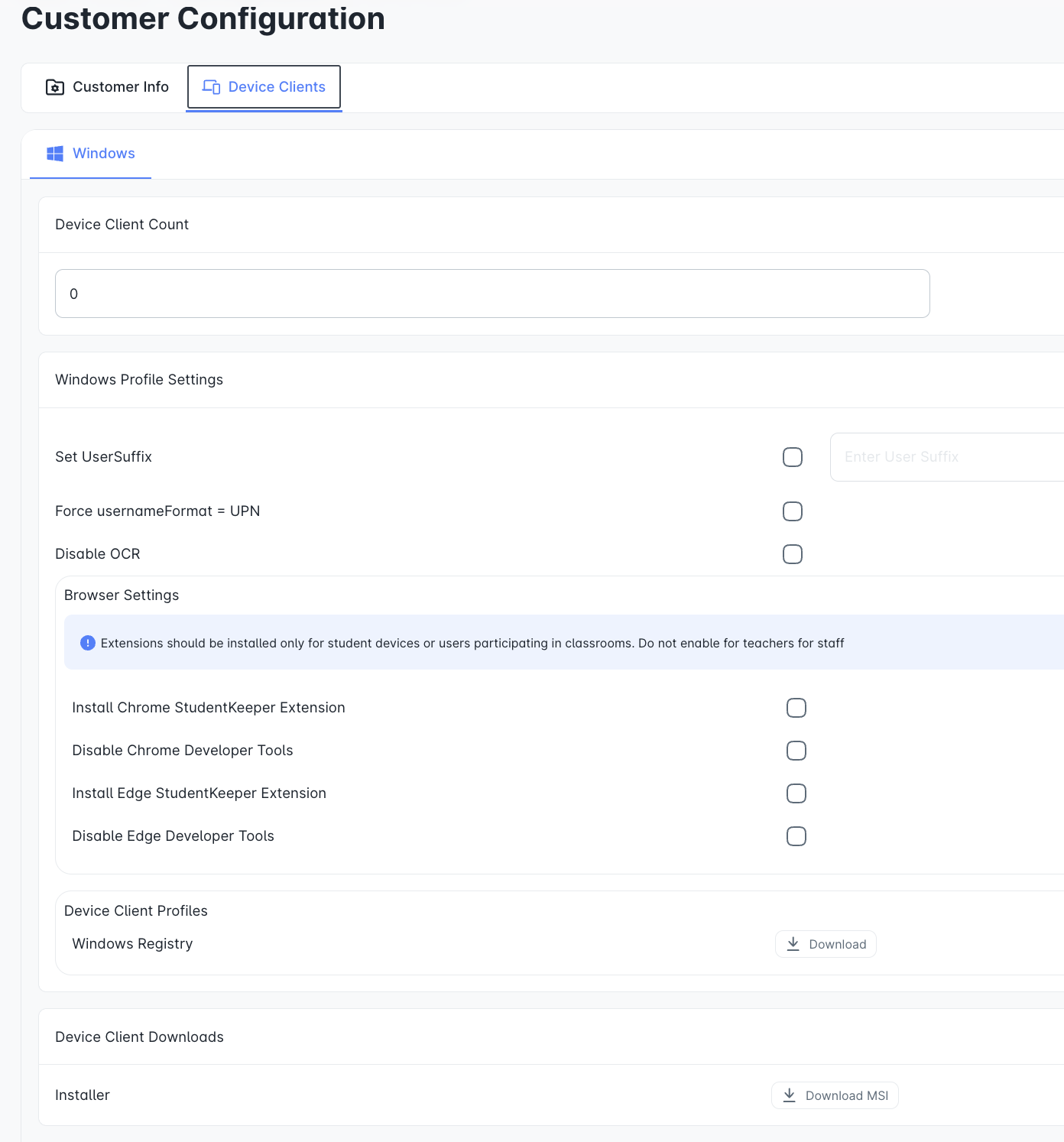
- Customer Configuration Page for Windows: A new Device Clients section has been added to the Customer Configuration Page, giving authorized staff a centralized place to manage Windows client setup and deployment. From this interface, administrators can access Windows installers and manage extension deployment settings all in one location.
- Tweaks & Fixes: Resolved issues with class expiry date updates, role and customer creation errors, and Edlink onboarding, while improving Wonde integrations and student profile visibility. We also enhanced scrolling for Users and Groups, refined breadcrumbs, and ensured student device logins added via sync can no longer be edited.
Classroom Management
- Tweaks & Fixes: Improved Allow/Block List modal, and addressed class visibility.
Web Filter
-
Block Page Restore Defaults: A new Restore Defaults
button has been added to the Block Page Customization screen, making it easy to reset text, appearance, and behavior changes if needed. When selected, you’ll see a confirmation message before any changes are made to help prevent accidental resets.
- Tweaks & Fixes: Corrected an issue where the incorrect year was displayed and resolved a problem that caused the Local URL Classification page to become unresponsive when loading or scrolling within the Allowed category.
Safeguarding
- Tweaks & Fixes: Inactive Note types no longer show up as options, fixed Note visibility, and improved Capture page pagination.
StudentKeeper Cloud Platform Update V206
Platform
- Tweaks & Fixes: Addressed intermittent Microsoft SSO errors, solved ownership issues with Notification templates, resolved Wonde integration duplication issues, improved class visibility for administrators, enhanced workflows with date and time support, fixed user edit issues, enabled all users to be added as co-teachers, and added new Qmlative fields.
Classroom Management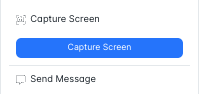
- In Session Screenshots: It is now possible to take a capture of a student's screen within an active class session using the Capture Screen tool. This saves the capture in the capture panel.
- Time Block Session ReRoutes: When a time block kicks in, active sessions will now automatically reroute back to the Classes page.
Web Filter
- Tweaks & Fixes: Made improvements to URL Classifications, and added an informational bubble on the DSL Configuration Page that informs users about supported vs. non-supported DSL use cases.
Safeguarding
-
Tweaks & Fixes: Fixed error with captures loading, and addressed issue where Note Subtypes were not populating.
StudentKeeper Cloud Platform Update V111
Platform
- Automations Available for Sub Accounts: Fixed issue where Automations section was inaccessible within agency sub-accounts. Agency users can now view, create, and manage workflows as expected, restoring required automation for their schools.
- Tweaks & Fixes: Improved performance and usability across the platform, including faster loading of Audits sections, refined System Administration permissions, and quicker load times for the Active Integrations page.
Classroom Management
- Join Class Support for Time Blocks: The Join Class button is now automatically disabled when a Time Block is active. This helps prevent students or staff from joining a class outside of the allowed time window and ensures sessions follow the intended schedule.
Web Filter
- Policy Enforcement Consistency: Updates to the “Behavior of Applications NOT listed below” policy in StudentKeeper are now automatically transmitted to the Client Network and ContentKeeper, reflected in CK App Defender, and enforced consistently across all traffic.
-
Live Viewer Reporting Columns Display Correctly: Several reporting columns in Live Viewer have been
updated to ensure they now display the correct information, improving accuracy and reliability when reviewing activity and audit data. This includes corrections to fields such as Request Type, Authentication details (Last/Next Authentication, Method), and Media Category, along with verification that other columns are consistently populated as expected.
Safeguard Settings
- Change Type "System" to Type "Sample in Safeguard Settings>Keyword Management: The keyword Type label has been updated from “System” to “Sample” to better reflect its purpose and reduce confusion when reviewing or managing keyword entries.
-
Safeguard Setting Name Shown in Capture Details:The Capture
Detail view now displays the name of the associated Safeguard Setting, making it easier to understand which safeguard configuration triggered the capture and simplifying review and follow-up.
- Send Notes to CPOMS via Automations: You can now add a “Send to CPOMS” action to Automations, allowing Notes to be automatically sent to CPOMS as part of your configured safeguarding process.
- Tweaks & Fixes: Improved searching Notes experience.
StudentKeeper Cloud Platform Update V1228
Platform
-
Title and Product Role Visibility for Staff Profiles:
Staff profiles now clearly display both the job title imported from your data sync and the role assigned for StudentKeeper access. This update makes it easier to understand a staff member’s organizational title alongside their functional permissions in StudentKeeper, reducing confusion and improving day-to-day administration.
-
Access Release Announcements and Updates Anytime: Release announcements and updates are now always available from the megaphone icon. When a release is live, users can open the announcement at any time
by clicking the icon—so nothing is missed due to timing. This makes it easy to review each release and announcement at a pace that works for you.
- Accounts Now Update After Name Change: Previously, a user could become disconnected from their existing StudentKeeper account when their name changed. This has been improved so accounts are now matched and merged using the integration ID rather than name alone. As long as the integration ID remains consistent in the data source, name changes will be handled seamlessly. If the integration ID changes at the source, a new account will be created, which is expected behavior.
- Tweaks & Fixes: Resolved issues affecting organization time zone updates and adding non-teacher roles as co-teachers in groups. Pagination behavior has also been corrected to improve consistency and reliability across the platform.
Classroom Management
- Expanded Co-Teacher Assignment Options: Staff members with product roles beyond Teacher can now be added as Co-Teachers to both synced and custom classes. This provides greater flexibility when assigning classroom responsibilities and ensures the right staff have access to support and manage groups.
- Tweaks & Fixes: Classes can now be edited by class owners as expected. Improved error handling for Time Blocks and resolved issues where notes and captures were not loading correctly from the class tile. Class search has been fixed to return expected results, including resolving issues caused by spaces in class names. Errors when applying block lists have also been addressed, ensuring class tile actions behave as expected.
Web Filter
- Tweaks & Fixes: We’ve improved how embedded content is detected on decrypted LMS pages by aligning our DSL handling with the same scanning approach used by Express clients. This results in more reliable behavior and better compatibility with platforms like Canvas, McGraw Hill → Actively Learn, and Storyline Online, with expected results confirmed through YouTube and DSL testing.
Reporting
- Student User Name Search: Student searches have been improved to query all associated usernames under a student’s login details. This ensures more complete and accurate results when searching for students in reports.
StudentKeeper Cloud Platform Update V1214
Platform
- Enforced School-Based Data Access Controls: To strengthen student data privacy, Ativion enforces strict school-based data assignments. By default, users only have access to student information where they are directly associated through MIS/SIS enrollments. Organization Admins, Site Admins, and other staff without enrollment-based relationships will not see any student data unless they are explicitly assigned to one or more schools and granted permissions. This ensures organizations have full control over who can view student records and supports a clear model for granting and managing access.
- Tweaks & Fixes: Resolved issues affecting bulk user edits, improved messaging when promoting users, streamlined several permissions for easier management, and fixed errors related to time zone updates.
Classroom Management
- Prevent Session Controls from Attaching to Groups: We’ve removed the default Session Control option ahead of the upcoming Shared Controls feature. This prevents unintended list application caused by automatic class associations. On the class tile, a teacher’s most recently used list will now appear at the top of the dropdown. We recommend verifying the selected control before starting a class.
- Updated Default Behavior for Session Access: Safeguarding Leads and Site Admins must now explicitly be given "Start Class" permission to begin or join a class. This default prevents accidental interference with ongoing classes. Access behavior can be adjusted through role permissions as needed. This improvement also removes the Administrator toggle as this option is no longer required.
- Updated Class Session Stop Behavior: To prevent accidental disruption and strengthen session integrity, the Stop Class workflow has been enhanced with stricter access controls. Users who are not the class owner, such as Safeguarding Leads, Organization Admins, Site Admins, or other staff, must now have explicit permissions to end an active session.
- Time Block Improvements: More stability with error handling and time block application.
- Tweaks & Fixes: Parent Groups display class card actions in line with normal Classes, and improved thumbnail behavior and stability.
Web Filtering
- Tweaks & Fixes: Policy assignment pagination now loads more than 20 results.
Safeguarding
- Tweaks & Fixes: Resolved issues affecting Note and Capture visibility, keyword updates, and Note subtype pagination. Also fixed Capture View access for the Admin role.
StudentKeeper Cloud Platform Update V1123
Platform
- Emails Can be Updated for Manually Added Users: Organization Administrators can now update the email addresses of manually added users, offering greater flexibility in user management and making testing easier.
Enhanced Data Filtering: Data filtering is now strictly controlled by enrollments. Ensure all manually created users have schools associated with schools.
- System Default Session Time Out: Class sessions now automatically end after 3 hours to prevent stale sessions, avoid conflicts, and ensure students aren’t impacted in other classes.
-
Site Admin Role Limited to Assigned School: The Site Admin role now includes expanded administrative functions, allowing Organization Administrators to delegate basic management tasks to Site Admins while keeping their access limited to their assigned schools.
- Set up Automations by User Role:Admins can now tailor Automations to individual user roles, making it easier to deliver the right actions and alerts to the right groups.
- Tweaks & Fixes: Improved pop-up and confirmation messaging, resolved Wonde integration error states, enhanced data filtering for synced and manual users, made timezone selection case-insensitive, refined search behavior, and delivered several permission updates including default permission cleanups, removal of “reset to default” from custom roles, and broader permission refinements.
Classroom Management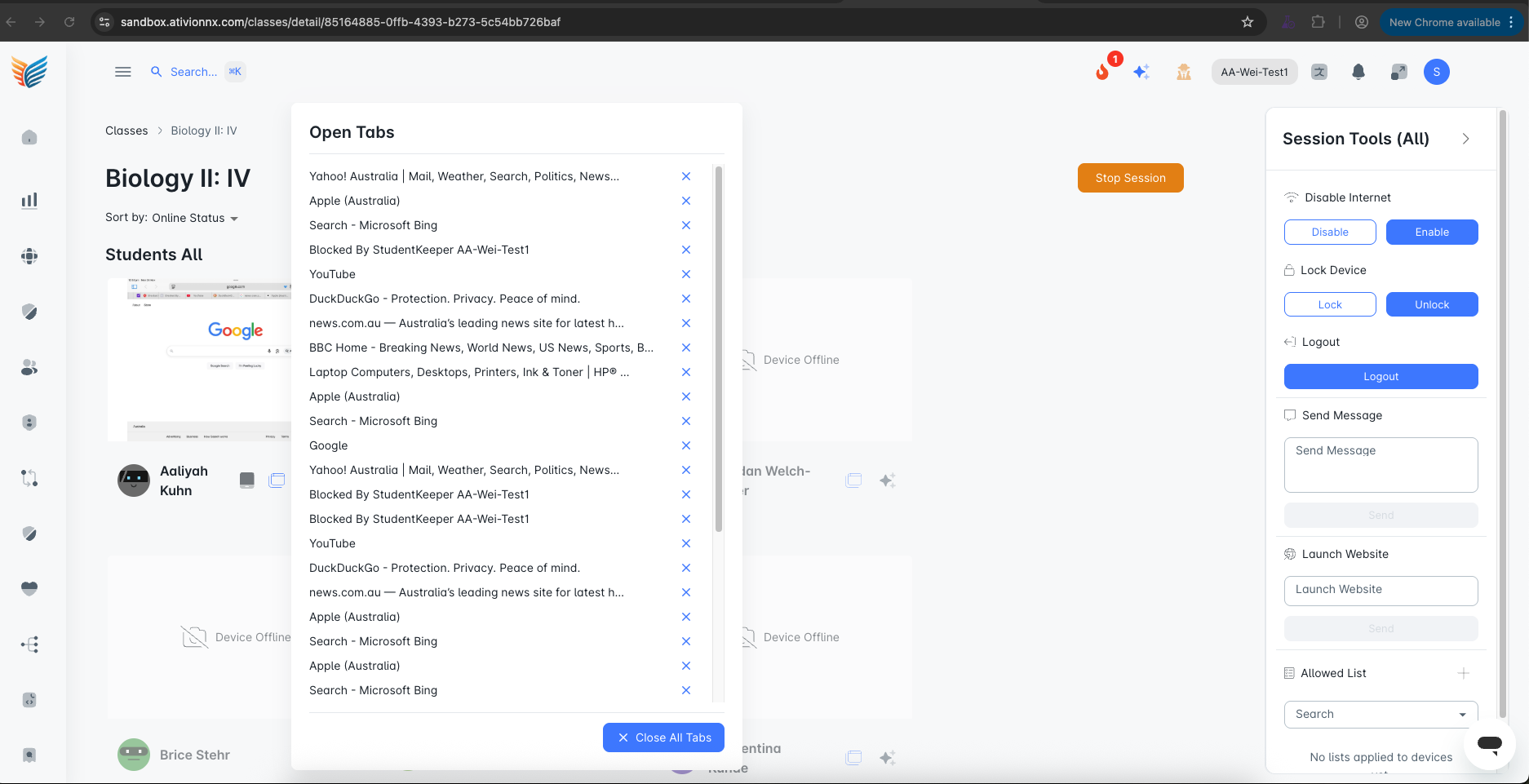
- Scrolling Support for Open Tabs: Quick Tab View now includes scrolling support, enhancing navigation and making open tab management more efficient during class sessions.
-
Removed "Teacher" Constraint from Classes: The “Teacher” field on Classes is no longer limited to users with the Teacher role. Any staff-based user can now be assigned as a teacher to custom or synced classes, providing greater flexibility in creating student groups and monitoring devices, Class names limited to 80 characters.
- Class Tile Buttons Disabled when Class is Empty: To improve the user experience and set clear expectations, classes with no students and no available data will now display disabled toolbar icons. This prevents confusion and helps educators understand when class tools are not applicable.
- Improvements to Time Blocks: Time Blocks are back online with key updates, including the ability for administrators to restrict class session starts to defined school hours. This release also fixes an issue where teachers weren’t appearing as instructors for their imported classes, adds permission refinements and class-name limits, and resolves an error preventing deleting Time Blocks.
- Tweaks & Fixes: This update improves thumbnail behavior and reduces “Device Offline” flicker while navigating. We also consolidated and clarified classroom management permissions for greater consistency, and enhanced class timeout performance and behavior.
Web Filter
- Tweaks & Fixes: This update improves save behavior throughout filtering actions and includes refinements to how permissions are applied for clearer, more reliable access management.
Safeguarding
- Edit for Multiple Safeguard Settings: Safeguard Settings now support bulk editing, making it easier to manage multiple items at once and providing a more consistent experience across StudentKeeper.
- Captures Viewable When Attached to Note: Captures attached to Notes can now be previewed directly within the Capture portal, making it easier to review and reference related content.
- Group View for Captures: Group View for Captures if back. If you would like this turned on, please reach out to Support.
- Tweaks & Fixes: Improved capture filters for grouped captures, updated messaging, fixed note associations across multiple schools, enhanced the date/time field in Notes, and improved messaging on the capture page.
Reporting
- Tweaks & Fixes: Delivered permission refinements to ensure reporting access is cleaner, more consistent, and easier to manage.
Reporting Update V1121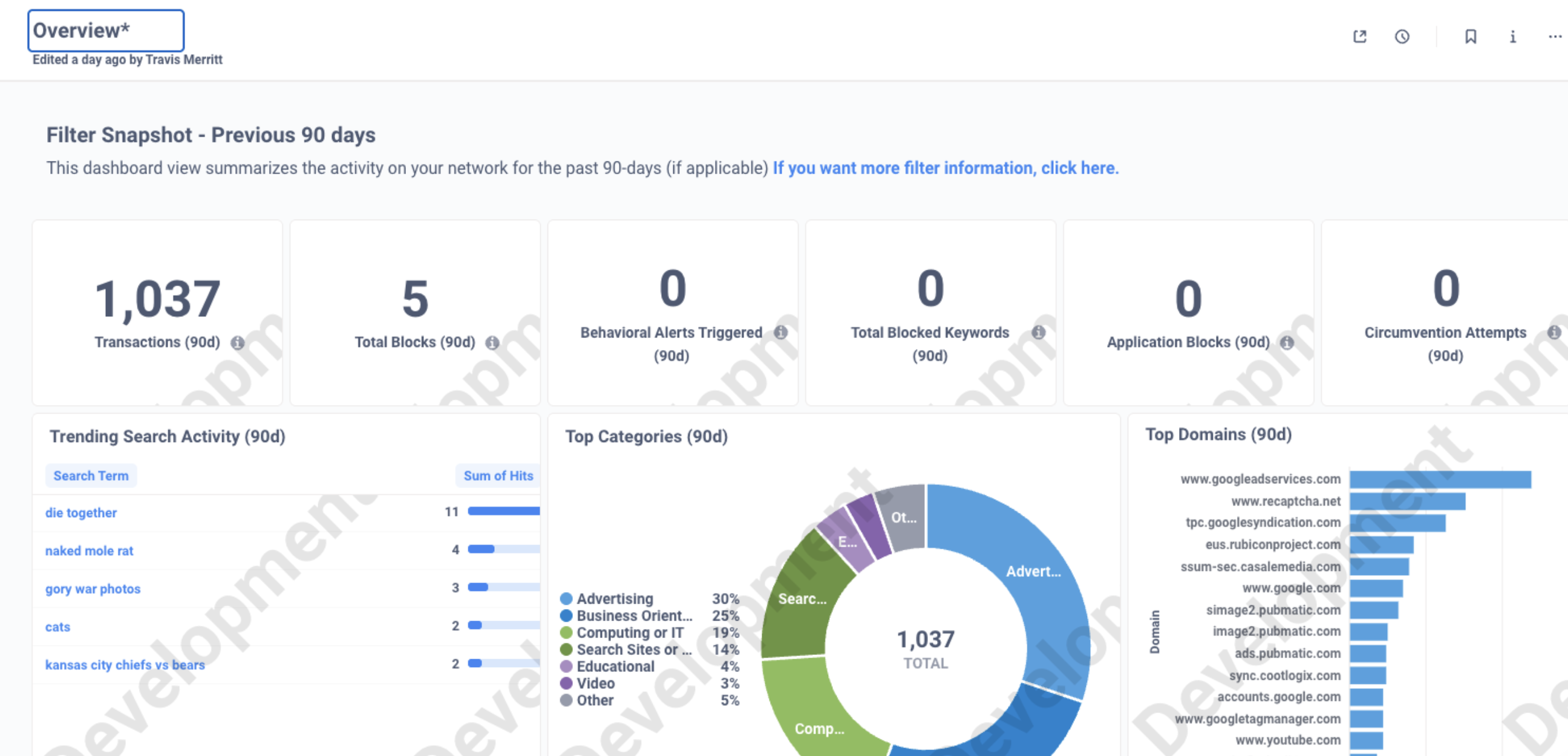
Changed “Organization Overview” to “Overview”
- The report previously titled “Organization Overview” has been renamed “Overview.” This change simplifies the interface and avoids regional terminology creating a more consistent experience across customers.
Filter Overview Dashboard
- The Filter Overview Dashboard has been redesigned to improve reliability, simplify navigation, and expand the scope of insights while maintaining a clean interface with streamlined filtering controls. The dashboard is now accessed directly from the Reporting menu and displays up to 365 days of activity, including data from “today”. This redesign gives Administrators a complete and current view of filtering trends.
New Dashboard Tabs
- Our new 7-day, 90-day, 365-day, and 10K-row views make it easy to access quick summaries or dive into full-history trends whenever you need them.
Mid Release Update V1119
Time Blocks Can be Set
- While some UI improvements are still in progress, such as teacher routing, messaging updates, and refinements to the Admin experience, we know that having this capability available now is essential for security. You can begin setting Time Blocks today, and additional enhancements are on the way."
Enhanced Session Control Visibility and Restriction
- Users can see any session control applied to their class and overwrite this. Administrators are also restricted from applying a control to a class they do not own.
To prevent any Session Control from launching, select “No Session Control” from the dropdown before choosing Start Class.
Newly Created Session Controls Do Not Promote to Default
- When you create a new Session Control, it will not automatically become the default. To set it as the default for a class, edit the class from the class tile.
Improved Load Issues with Bulk Class Ending
- Improved performance for large customers by resolving load issues that could occur when many classes stopped at the same time.
Session Timeout Settings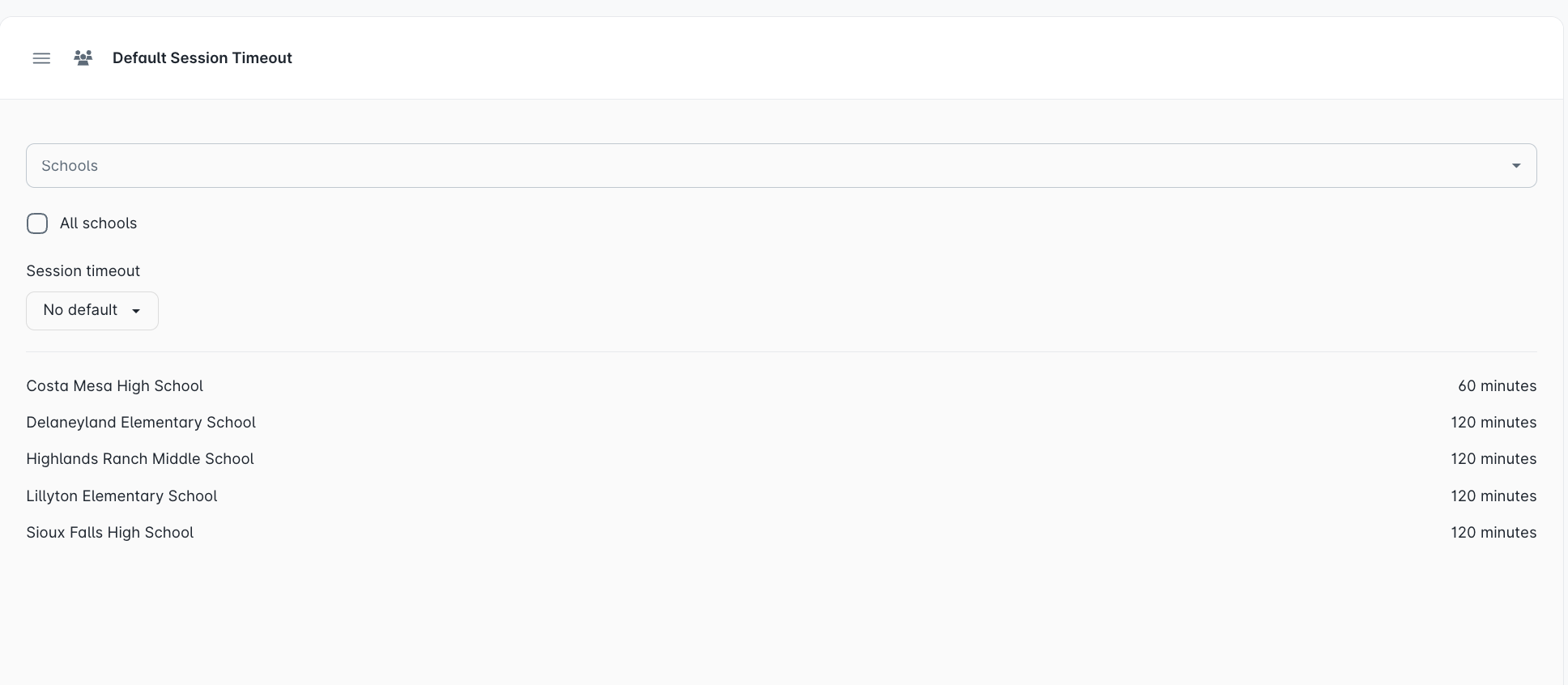
- Organization Administrators can now set a default class session timeout under System Settings > Classroom Management. This helps ensure class sessions automatically end on time and do not extend into after-school hours or overlap with other classes.
In this first version, Session Control settings will not overwrite the default. If a teacher is double blocked, they may need to start a second session if the Default is configured to a shorter interval.
“Allow List” Temporarily Disabled
We are temporarily disabling the Classroom “Allow List” feature, which applies web controls during class sessions. As part of our ongoing commitment to improving your classroom experience, we’ve identified several enhancements that will make this feature more reliable and effective. To complete this work, the “Allow List” feature will need to be disabled temporarily.
Restoring and improving this feature is a top priority, and our team is actively implementing the updates required for its re-release. We’ll provide regular progress updates and notify you as soon as the enhanced version is available.
Agency Account Menus Reflect Latest Changes
- Agency accounts now have an updated menu designed to streamline management and provide easier access to sub-accounts’ settings.
Update V928
Platform
-
Updated Navigation & Permissions: StudentKeeper now features an updated navigation layout built
around real-world customer workflows, making it easier to access the tools you use most. Permissions have also been reimagined to provide clearer visibility, simplified management, and support for bulk role updates across large groups of users.
- Administrator Note: All permissions will be reset to Defaults. This will provide a consistent base for all users based on enrollments and data access. Extended permissions, like "Access to All Students at Assigned Schools" will need to be add to be roles as needed. We suggest using the Impersonate feature to review each role's access.
- Directory Service Support in Workflows: Customers can now build workflows using their own Directory Service Groups directly within Safeguard Settings. This enhancement ensures notifications and alerts are based only on customer-managed groups, improving accuracy, security, and alignment with district directory structures.
-
Mircosoft SSO: StudentKeeper now supports Microsoft Single Sign-On (SSO), allowing users to log in with their existing Microsoft credentials. This update simplifies access for staff and students, reduces password fatigue, and enhances overall account security through district-managed authentication.
Note: Microsoft SSO was still awaiting a small infrastructure deployment.
- Pop-up to Confirm Timezone after Acceptable Use: When the first administrator logs in, they’ll be prompted to confirm the organization’s time zone. Setting this upfront ensures accurate timestamps across sessions, reports, and notifications. The time zone can be updated anytime under Customer Configuration in System Settings.
-
Admin Role Toggle: A new Admin toggle in role settings helps clarify and manage data access when assigning administrative permissions. The toggle indicates that the selected role has organization-wide admin rights, improving transparency and reducing setup errors. This is a temporary enhancement while we update role logic to support more flexible admin levels in upcoming releases.
- User Impersonation & Agency Navigation: Administrators and agency users can now seamlessly return to their own accounts after impersonating another user; no re-login required. This streamlines troubleshooting, user support, and account management workflows.
-
Added Permission for Impersonate User: Administrators can now assign the Impersonate Users permission to themselves or other users, allowing them to troubleshoot issues and provide direct support during training or onboarding. To maintain security and prevent errors, users cannot impersonate their own accounts.
- Improved Promotion and Automapping Options: Administrators can now manage invite and login options directly from the Role panel when enabling auto-promotion based on data source role types. This streamlines onboarding and reduces setup steps. Additionally, users with a Guardian role will no longer experience access or functionality issues when assigned additional roles.
- New School Column on User Pane: A new column in the User Management panel now displays each user’s school association, making it easier for administrators to manage roles, verify permissions, and ensure accurate access across schools.
-
Improved Data Explorer Layout: Data Explorer is now located under Reporting for a more intuitive workflow. It has also been redesigned with a tabbed layout that aligns with the overall StudentKeeper experience, making data navigation and analysis faster and more consistent.
- Tweaks & Fixes: This release delivers a range of stability and usability enhancements across StudentKeeper. We resolved an issue that caused roles to be lost during full data syncs and improved data integration reliability, error handling, and sync performance. We also standardized “Time Zone” labels, simplified the selector, and fixed a profile screen jump and manual school association issue. Teachers can now rename or edit their classes, and an “X” button has been added to the Classes search bar for quick clearing. Finally, we updated the “People” label on the integration page, and manually added users can now be deleted.
Classroom Management
-
Added Edit Button to Class Tile: To
improve clarity and reduce accidental clicks, an edit icon has been added to each class tile. Selecting the icon opens the class, allowing users to easily update the title and manage class membership in a more intentional, streamlined way.
- Session Control Improvements: Session Controls have been improved to restore delete functionality and ensure visibility is limited to owner of list. Control over editing and deleting lists now belongs exclusively to the list creator. The class assignment option has been removed from Session Control creation. Default controls can instead be set directly from the Class tile using the new edit icon. These updates help prevent teachers from applying controls to other sessions and ensure that Session Controls are owned and managed solely by their creator.
- Multiple School Support for Custom Groups: You can now create custom groups that include users from multiple schools. This makes it easier to manage cross-school initiatives, share insights, and apply settings consistently across your organization.
-
Removed Group Assignment from Session Control Edit: Session Controls
have been streamlined for easier management. Class assignments are now handled directly from class settings, making it simpler to apply and share default controls. All previously created controls remain available for continued use.
- Added School Name to Class Tile: Based on customer feedback, school names now appear on class tiles. This addition helps administrators and support staff quickly identify and locate classes across schools.
- Allow & Block List Site Validation: To improve accuracy and reduce errors, validation feedback has been added when teachers enter websites while creating Allow or Block Lists within a session. This ensures only valid website addresses are submitted.
- Tweaks & Fixes: Several improvements have been made to enhance stability and clarity within Classroom Management. Chrome Screen Share has been temporarily hidden until full implementation is complete. Session Control deletion now works as intended, and time block details are visible during creation for easier setup. All sorting options have been fixed for consistent behavior, and time blocks are now only visible to their creator and users with organization-level access.
Safeguarding
Note Security: Notes are undergoing a long term overhaul. This will make these more useful and allow teachers to easily collect data throughout a lesson automatically. Until the next release, the Note views on Classes and Class tiles will not populate. Please visit student profiles to access Notes. Full upgrade will be coming very soon.
- Tweaks & Fixes: This update includes multiple improvements to Notes and Safeguard Settings. Users can now click to enlarge captures attached send directly by email. A time field has been added to Notes for better context, and issues with capture visibility and note saving failures have been resolved. Subtype visibility has been corrected, and note change history has been enhanced for clearer tracking. Additionally, editing an empty note no longer causes errors, and administrators can now edit multiple Safeguard settings at once for faster configuration.
Web Filter
-
Expanded Web Filter Permissions for Greater Control
: Web filter permissions have been expanded to provide more precise control over access to filtering components. This update gives administrators greater flexibility in managing who can view, configure, and maintain filtering settings.
- Live Viewer Performance: Optimized event batching and queue logic, increasing throughput for faster, more complete real-time monitoring.
- Live Viewer Query Handling: Added a requirement for user, domain, or category filters before initiating live data streaming, reducing unnecessary system load and improving responsiveness.
-
Tweaks & Fixes: Improvements ensure accurate keyword synchronization, better policy handling, and more responsive live activity monitoring. Global Keyword Profiles now sync correctly after re-linking appliances, subnet-based policies apply consistently, and Live Viewer performance has been significantly increased with faster, more efficient filtering and display. Version gating also ensures only compatible filter configurations appear within the SK interface.
- Organization Administrator Note: User interface items introduced in this release may remain visible, but inactive for users running CK appliance prior to 195.13.
-
Added Edit Button to Class Tile: To
StudentKeeper Cloud Platform Update v922
Platform
-
Bulk User Update Options on Promotion
Page: Administrators can now assign roles during promotion and choose invite options; either sending an email invite or skipping the invite for SSO access. This gives schools greater flexibility and control over onboarding.
- User Promotion Screen Now Shows School and Role: The User Promotion screen now displays each user’s associated school and role, making it easier for administrators to confirm details during promotion.
- Tweaks & Fixes: Resolved issues with students not saving when editing synced groups, unexpected logouts when accessing Automation Settings, and delays when promoting users. Improvements also include more reliable onboarding notifications and greater overall stability.
Classroom Management
- Tweaks & Fixes: Improved class page performance with faster load times, restored the ability for teachers to rename and edit classes, and fixed issues with group creation at manually associated schools. Additional fixes include better visibility for session controls and weblists, proper functioning of the weblist delete button, elimination of flashing tab menus when users left a session, and the return of search functionality in both My Classes and Classes in Session. The multi-select UI on class edit has also been improved for a smoother experience.
Safeguarding
- Tweaks & Fixes: Enhanced school visibility on Notes and merged global keyword profiles with safeguard mappings and exclusions for more consistent policy management.
Reporting
- Tweaks & Fixes: Analytics Explorer permissions have been corrected so dashboards now display as expected.
Web Filter
-
Tweaks & Fixes: Improved syncing and update performance for Nexus Filter, including support for full initial syncs with incremental updates. API timeouts were extended for greater reliability, and issues were resolved with Entra ID group counts in policies, keyword management sorting, and the unsaved changes popup. Updates also include clearer error messaging on the integrations page, refreshed macOS profile content for demo and production, and fixes for intermittent “filter not found” errors.
StudentKeeper Cloud Platform Update V831.2
Platform
- User Promotion Optimization: Resolved occasional time out with User Promotion. Promotions now complete reliably, ensuring new users can be set up without disruption.
- Wonde Email Flow: Updated the sync structure so that additional email fields are only used if the primary “Email” field is empty.
Classroom Management
- Open Tabs Optimization: Improved efficiency and resiliency of the Open Tabs feature. These changes allow the system to process many more updates in parallel, delivering faster performance and greater reliability when viewing and managing student tabs.
StudentKeeper Cloud Platform Update V831
Platform
- Tweaks & Fixes: Issues with page redirects, email delivery, user promotion, and sorting on the User page have been resolved, along with fixes to the Teacher & Staff selection and Provider display. We also improved how time zones are handled, enhanced Wonde integration, and strengthened syncing for greater reliability. To keep things cleaner and easier to use, we removed outdated permissions, stale groups, and the “Never Logged In” label from the User page.
Classroom Management
- Tweaks & Fixes: We’ve made updates to Classroom Management to improve reliability and ease of use. A bug that prevented some classes from starting has been fixed, ensuring sessions launch as expected. We also resolved pagination issues so it’s now easier to navigate smoothly across class lists and records.
Safeguarding
- Tweaks & Fixes: We delivered updates to Safeguard that streamline the user experience by fixing and cleaning up UI bugs in the settings area and improving the behavior of confirmation pop-ups for greater clarity and consistency.
Web Filter
- Tweaks & Fixes: We’ve delivered a set of improvements to make web filtering and policy management more reliable and user-friendly. Login and policy issues tied to usernames and domain handling have been resolved, and directory syncs now run faster and more smoothly. We also improved how custom URLs are filtered, ensured exceptions can be managed correctly, and fixed interface issues like missing menus and dropdown items. Together, these updates strengthen filtering accuracy, improve performance, and provide a more consistent experience when managing policies.
StudentKeeper Cloud Platform Update V824 + V817
Platform
-
New Navigation Coming Soon!: Our enhanced navigation, currently available under "New Nav" feature flag, offers a
- Timezone Viewable on User Profile: Users can now view their assigned timezone within their product profile. While this field is not editable, it provides clear visibility into the timezone used to power their program and associated data, ensuring consistency and transparency.
- Multi-identifier Login Support for Windows Clients: Previously, the system only supported a single login string which was suitable for Chrome’s email-based logins. Windows clients can now handle both SAM account names and UPNs. This improvement ensures smoother authentication regardless of the registered login format.
- Improved Data Sync to Resolve Time-outs and Missing Data: Enhanced integrations to better handle large sync operations, preventing time-outs and ensuring that missing data is correctly detected and re-synced. These improvements deliver more complete and reliable data synchronization for connected systems.
- Data Syncs Now Account for Stale and Out of Date Data: Enhanced data synchronization to detect and account for stale or outdated records, ensuring all information is current and consistent across connected systems. These improvements reduce discrepancies and maintain data integrity during sync operations.
-
Keep me Logged In: Users can now choose to re
main signed in throughout the school day. This reduces interruptions, saves time, and ensures teachers and staff stay focused on teaching instead of repeatedly entering credentials
- Customer Configuration Page: A new page in System Settings now allows Administrators to view current licensing details and active modules. Additional functionality will be added in the future to support deployment management.
-
Bulk Edit Users: Administrators can now edit users in bulk, making it faster to manage large groups. This
feature supports common actions such as resending invitations, associating users with schools, and adjusting roles, all in a single streamlined workflow.
-
Renamed User Profile Button"Settings" to "User Tools": To better
reflect the contents of this section—which includes support chat, release history, and privacy links—we’ve renamed it to provide clearer context, as it does not contain any actual user-configurable settings.
- Tweaks & Fixes: We’ve delivered a series of improvements designed to make the platform smoother, more accurate, and easier to use. Teachers are now taken directly back to the Classes page when ending a session, and password reset emails are delivering reliably again. Profile editing and note counts now behave as expected, ensuring data accuracy and proper permissions. Searching for users has been improved, both by name and after role updates, and syncing issues with schedules and schools have been resolved. Administrators also gain more flexibility, including the ability to create custom groups by associating users with schools. Together, these updates strengthen reliability, safeguard data access, and support a better everyday experience for teachers and admins alike.
Classroom Management
- Improved Experience to Preserve Active Class Sessions: Actions taken during an active class session now open in a new tab or window by default. This enhancement helps maintain the integrity of the live session and minimizes disruptions caused by in-app navigation.
-
Time Blocks for Individual Schools: Time Blocks can now be assigned at the school level, allowing each school to customize schedules independently, regardless of differing start and end times.
-
Toggle Filters Classes to Current Term/Semester: Updated class filtering to
automatically display only classes from the current term or semester, reducing clutter and helping users quickly find the most relevant classes.
- Tweaks & Fixes: Tweaks and fixes to improve classroom management and overall usability. Administrators now have greater flexibility with the ability to create custom groups by associating users with schools. Time Blocks are more reliable and clearer to use, the Start button is now grayed out when restricted (with a helpful tooltip), and minor spelling and labeling corrections have been made. We also resolved an error that could occur when ending a class session and improved breadcrumb navigation for teachers so it updates consistently. Together, these updates make the platform smoother, more accurate, and easier to navigate.
Safeguarding
- Tweaks & Fixes: Improvements to safeguarding and keyword management to make the platform more reliable and easier to use. Categories in Safeguard Settings are now sorted alphabetically for quicker navigation, and the “Applied To” column displays a clear settings count with a helpful tooltip. Issues that caused errors when editing notes or saving empty keywords have been resolved, inactive keyword groups now display properly, and keyword highlighting has been fixed for terms ending in punctuation. This release also introduces dynamic profile assignment support and includes performance enhancements to prepare for future features.
Web Filtering
-
UI Enhancements for Add New URL Classification: Improved the Create New URL flow to support the Enter key for quicker submission. The Edit URL Classification page now includes a list icon, saves changes reliably, and hides the “Predict Classification” button when creating a new entry. Additionally, clicking “Predict Classification” now blocks the full page during processing, removes the notification message, and refreshes the chart data only.
- Added List View and Grouped View to Url Classification Page: Users can now toggle between List View and Grouped View when reviewing Local URL Classifications. List View offers a straightforward, linear format ideal for scanning and managing large sets of individual URLs quickly. Grouped View helps users identify trends by clustering similar URLs together, making it easier to spot patterns in site behavior and classification needs.
- URL Classification Export: Implemented a robust background service in the ContentKeeper Datacenter platform that periodically retrieves URL classification data from the cloud classification server. The results are securely stored for future use in downstream processing and auditing.
-
Tweaks & Fixes: Improvements to Web Filtering to boost performance, reliability, and ease of use. Stability and backend processing have been enhanced, while the block page now features clearer button styling for better visibility. Administrators can also delete entries more easily with the enabled delete button on the local URL classification page, and the Dynamic Safe-Listing (DSL) cache has been expanded to support longer entries. In addition, a new message ID cache prevents duplicate processing, syncing issues with local URLs have been resolved, and backend optimizations further reduce errors and improve overall efficiency.
StudentKeeper Cloud Platform Update V810
Platform
-
User Role Expiry: Administrators can n
- Moved Data Explorer to Settings and Added Permissions: We’ve relocated Data Explorer to the Settings menu for easier access by administrators and to streamline the main navigation. This update also introduces a dedicated permission set, giving organizations full control over who can access and explore institutional data.
Web Filtering
- Tweaks & Fixes: We’ve made several improvements to enhance your experience with web filtering. Filtered URLs now load more reliably, and a new “AI & Fetch Summary” column helps provide clearer insight into how sites are classified. We’ve also added more control over who can manage filtering tools, ensuring only the right users have access based on their role.
Classroom Management
- Auto Session Expiration: Classroom sessions will now automatically close after 12 hours of inactivity, helping prevent leftover sessions from impacting students and live sessions.
StudentKeeper Cloud Platform Update V803
Platform
-
In Product Announcements: You’ll now see key release highlights directly within the platform through
in-product announcements. This ensures you’re always informed about the latest updates. This feature can also be leveraged to quickly share important messages or timely alerts, helping you stay connected and up to date.
- Tweaks & Fixes: We’ve made several updates to enhance clarity and ease of use across the platform. The “Teachers & Staff” page now more accurately displays all staff members and includes a new “Role” column to provide clearer context. Footer notes have been added to improve visibility and understanding on key pages.
Classroom Management
-
Time Block Exceptions for Session Security:
Admins can now create top-level exceptions to time blocks, allowing them to restrict session launches during school holidays, state testing, or other critical periods. This provides greater control and ensures sessions are only active during approved times.
-
Start Button is Disabled When Time Block is Active: When a time block is in effect, the Start
and Join Class buttons will be disabled, preventing users from launching sessions or viewing student screens until the restricted period ends.
- Tweaks & Fixes: Scheduling and classroom management are now more flexible. Admins can edit and delete TimeBlock schedules, search by role name, and select multiple roles for quicker setup. We’ve also restored the “Group Expiry” field on Custom Groups and improved live session reliability with better classroom status handling.
Student Safety
- Tweaks & Fixes: Resolved an issue where the incorrect icon was shown for iOS devices in Captures.
Web Filtering
- Added Support for ‘AI Services’ Category in URL Classification System: The URL classification system now includes a new category called AI Services. This category is fully supported in both URL classifications and policy settings, giving administrators more granular control over AI-related web content.
- Added "Button Color" to Blockpage Customization
Menu: Administrators can now personalize the appearance of the student-facing block page by selecting a custom button color, making it easier to align with school branding or improve visibility.
- Tweaks & Fixes: We’ve improved the URL Classification and Live Viewer experience. Local URL results now display more than just the top 20 entries, giving admins greater visibility. The Global Category column is clearer, and Live Viewer now keeps your preferred column order for a more consistent and efficient review.
Hotfix V730
- Addressed Issue Around Slow Thumbnail Loading: On July 30th, we received reports that thumbnails were loading more slowly than expected. This behavior was not aligned with intended performance. To address the issue, the team refactor areas of the code and released these improvements across all platforms the morning of July 31st.
StudentKeeper Cloud Platform Update V727
Platform
- Permission for Profiles: Profiles now has its own dedicated permission setting, giving schools and districts more precise control over who can view student and staff profile information. This ensures better data privacy and helps align access with each user’s role on the platform.
- Tweaks & Fixes: We’ve improved clarity and control across the platform. The “Create” button and access to Notes and Captures now only appear for roles with permission, and new profile settings give admins more control over user access. We’ve also introduced role deactivation and cleaned up class drop-downs to show only rostered groups.
Student Safety
- Policy Tooltip in Keyword Management: You can now easily see which policies are using a keyword group in Keyword Management—just hover over the policy count chip to view the assigned policy names.
- Tweaks & Fixes: We’ve improved Keyword Management for a cleaner, more reliable experience. Unnecessary text has been removed, errors during setup have been fixed, and access to safety data is now shown only to authorized users. We’ve also improved syncing for CK+SK schools and ensured the Manual Review Queue is displayed in the correct order.
Web Filtering
-
Tweaks & Fixes: We’ve streamlined student activity monitoring and web filtering. The Manual Review Queue is now easier to use, Live Viewer includes a default “Domain” column and alphabetized options, and filter policy issues have been resolved for smoother setup.
StudentKeeper Cloud Platform Update V720
Platform
- Tweaks & Fixes: Expiry date will not appear on synced classes, and secured pages/routes with role permissions.
Safeguarding
- Added "Gaming" as a Sub Category under "Behavior Concern": By adding Gaming as category, this allows teachers to set up automations to capture Game behavior while allowing the machine learning model to learn how to ignore gaming captures.
- Tweaks & Fixes: Several improvements to the Keyword Management experience, group sorting now works as expected on the Keyword Management page, and we’ve fixed an issue where keyword profiles could temporarily disappear after sorting. Additionally, access to Keyword Management is now correctly restricted for Agency accounts, aligning with intended permissions.
Web Filtering
- Tweaks & Fixes: Several updates improve backend handling and visibility for IT admins. URLs uploaded through the “Upload URL List” button in URL Classifications are now processed correctly. The Global Category for local URLs is now returned in the Nexus GUI via dynamic lookup, helping ensure accurate classification. Policy creation now correctly applies anonymization settings by default. Additionally, we’ve added a message ID cache in the SQS processor to prevent reprocessing and improved label consistency by updating “IGNORE” to display in all caps under Applications and Protocols.
StudentKeeper Cloud Platform Update V713
Safeguarding
-
Profiles Now Available in Filtering & Classroom Management:
Profiles have been moved out of the Classroom Management-only area, making them accessible across the platform. All customers can now benefit from the insights and data these profiles provide.
- Workflows Now Support Keywords: Organization Admins can now incorporate keyword list interactions into workflows. This enables automated actions such as generating alerts or creating Notes based on keyword activity.
Web Filtering
- Support for Uploading Unclassified and Reclassified URLs: A new API endpoint has been added to support the asynchronous submission of URLs for classification. It handles both URLs that have not yet been evaluated (unclassified) and those that were previously categorized but are being submitted for reclassification. This update enables more flexible and efficient processing within the URL classification workflow. (68226)
- Tweaks & Fixes: Ensured Global Keyword Profiles are correctly sent to newly linked devices (68063), prevented duplicate keyword updates from being sent to policies during filter sync (68130), and made UI adjustments to the pop-up on the Classifications page (68276).
StudentKeeper Cloud Platform Update V706
Platform
-
Ability Pause & Resume Integrations: Customers can now pause and r
esume their data integrations directly within the platform, giving them more control over when data syncs occur. This added flexibility helps reduce unnecessary syncs during transitions, simplifies troubleshooting, and supports smoother data management overall. This capability also lays the groundwork for future enhancements around customer offboarding and data retention controls.
-
SMTP For Notifications: StudentKeeper now supports SMTP
integration for outbound notifications. This allows districts to route safeguarding alerts and workflow messages through their own email infrastructure, improving deliverability, security, and administrative control.
Content Filtering
- Customer-Level Management of URL Classification: StudentKeeper now supports local URL classification management at the customer level. Administrators can assign URLs to custom or global categories and manage these classifications directly through the UI. This provides greater control and flexibility for tailoring filtering behavior to local needs.
- Keyword Exclusion: Keyword exclusion end to end support has been added to support customer-specific keyword overrides. This allows administrators to exclude specific keywords from global or shared profiles without altering the base profile structure enabling more flexible and localized filtering control.
- Quickly Group and Classify URLs in Bulk: Admins can now create custom URL categories and assign large batches of URLs to them in just a few clicks. Simply paste a list of URLs, give the category a name, and the system handles the rest—validating entries and syncing them automatically. This makes it faster and easier to organize and apply filtering policies at scale. An additional “Import URLs” option and built-in safeguards help ensure everything is clean and accurate before saving.
- Tweaks & Fixes: Global profiles are now fully removed when an appliance link is deleted, ensuring cleaner deprovisioning.
Safeguarding
- Permission for Safeguard Settings: A new permission set allows administrators to grant access to Safeguard settings for DSLs, Safeguarding Leads, School Counselors, and Principals. This change supports a more collaborative approach to student safeguarding by distributing responsibilities between IT teams and school-based staff.
-
Front End UI for Safeguard Setting>Create/Edit Setting: The new Create/Edit Safeguard Setting screen is now available. Safeguard Settings will empower both Network Administrators and Safeguarding Leads to define keyword trigger and capture settings, complete with role-specific alerts and notifications. Settings can be scoped to AD groups or SIS-integrated schools and may include both trigger and capture configurations. Backend integration is in progress, and full end-to-end functionality will be available in an upcoming release.
StudentKeeper Cloud Platform Update v629
Platform
-
15-Minute Increments in Time Selectors: Time selection tools across the platform now support 15-minute increments, providing greater flexibility when setting time-based configurations.
- Tweaks & Fixes: We resolved an issue that was preventing some student and teacher records from loading correctly, ensuring faster and more reliable access to profile data. Additionally, integration information is now consistently displayed, giving administrators clearer visibility into connected data sources.
Classroom
-
Time Blocks: Admins can now configure T
ime Blocks to control session access based on user roles. When a Time Block is active, affected users will be restricted from starting or joining class sessions during the designated time period, fixed bug of sessions not stopping.
Safeguarding
- Tweaks & Fixes: We’ve improved how “Raised by” fields behave to ensure more accurate tracking of who initiates notes and captures. Teachers can now access Sub Types, giving them greater clarity when categorizing concerns. The keyword management page has been updated to allow keyword profiles to be removed and re-added more easily. We also fixed an issue where keyword profiles were not set to “ACTIVE” by default, which previously caused policy syncs to fail. Permissions for keyword management have been refined, and note filtering has been enhanced for a smoother and more reliable user experience.
Content Filtering
- URL Classification V2: Improved filtering accuracy by supporting locked domains and smarter path-level detection, especially for complex URLs like proxies and sites.google.com. Behind the scenes, model and DynamoDB updates make categorization faster and more reliable.
-
Priority Policy Option: Administrators can now
designate a policy as a Priority Policy under the Preferences section. Setting a policy as a priority ensures it takes precedence over other policies when conflicts arise, helping enforce critical rules—such as safeguarding or security controls—more reliably and consistently across the system.
- Tweaks & Fixes: We’ve resolved an issue where Active Directory usernames were incorrectly showing a “No Longer Exists” message. User records now display accurately, ensuring better clarity and fewer interruptions when managing directory-linked accounts.
Reporting
- All Reports for Agencies: The “All Reports” view ensures reporting is relevant and aligned with agency needs.
Aria
- Tweaks & Fixes: Fixed Aria for students not responding.
StudentKeeper Cloud Platform Update v622
Platform
- Integration Details Now Visible to Customers: Customers can now easily view the status and key information about their integrations directly within the platform, providing greater transparency and self-service insight.
-
- Tweaks & Fixes: Secured page URLs to ensure access aligns with assigned user permissions.
Classroom
- Classroom Session Timeblocks: StudentKeeper Administrators can now restrict the ability to start class sessions outside designated school hours. With Timeblocks, admins can configure access based on user roles, ensuring students are only monitored during approved school times and strictly for educational purposes.
-
- Tweaks & Fixes: Welcome emails now send correctly to new users.
Safeguarding
- Keyword Management Page: The updated keyword management page now includes an edit button for easier list updates, a status chip to clearly indicate list activation, and a streamlined process for adding keywords to both system and custom lists. All keyword lists can be enabled for use in Policies or Safeguard settings, making management faster and more flexible.
- Keyword List Icons:Users can now assign icons to their custom keyword lists, making it easier to organize, identify, and manage multiple lists at a glance. A variety of icons are available to choose from. System keyword lists include pre-selected icons for quick visual recognition.
-
- System Lists: System keyword lists are professionally curated to support student safeguarding and can now be tailored by excluding specific words that may not apply to your context. Lists are also managed by regional stack, ensuring that terms remain accurate, relevant, and up to date for each region’s needs.
- Added Safeguard to Primary Menu: Safeguard is now a main menu option available to both Content Filtering and Classroom Management customers, providing unified access to shared student safeguarding tools and settings.
- Tweaks & Fixes: Resolved issues where the Save button was hidden by the AI Note Bot.
Content Filtering
- Tweaks & Fixes: Resolved a LiveViewer error and enhanced clarity and filtering on the receiver’s end for a smoother experience. Additionally, replaced the flat file system with a more efficient SQLite3-based table to improve performance and reliability.
Reporting
- Analytics Explorer Now Available in Agency Mode: Agencies can now access Analytics Explorer to build detailed, customizable reports across their sub-accounts, making it easier to analyze trends and support partner schools effectively.
StudentKeeper Cloud Platform Update v615
Platform
- New Permission for Managing Users: Admins can now give selected staff the ability to help manage user accounts. This makes it easier to delegate user setup and adjustments without giving full admin access.
- General Improvements: Teachers now only see information for the schools they are assigned to, improving privacy and access control. We’ve also resolved an issue with filtering and added a clear message when trying to create a user with an already-used email address.
Classroom
- Logout Option for Students: Teachers can now log students out of a session directly from the session tools. This ensures students are no longer monitored once they’ve left class.
Safeguarding Captures
- Processed Captures View: Captures linked to safeguarding notes will now appear in a new “Processed” section. This ensures no important content gets lost, even after it’s been reviewed.
Safeguarding
- Smarter AI Note Generation: When teachers use the AI Note Generator, key information—like student name, class, and school—is automatically filled in based on where the note is created. This makes it faster and easier for teachers to record important details.
- Keyword Management Flexibility: Schools now have more control over keyword lists, with the ability to remove specific terms from system-managed lists while still receiving regular updates.
- General Improvements: We’ve made note creation and editing easier to use, with clearer wording, improved field behavior, and better visibility for attachments and who submitted the note. Keyword highlights in captures and enhancements to parent communication make safeguarding workflows smoother.
Content Filtering
- Policy Improvements: Cloning a policy now correctly includes keyword settings, and we’ve resolved an issue with syncing updates from Google web services.
Comments
0 comments
Article is closed for comments.